
e621 RSS feeds
once upon a time, I discovered a little-known website for furry art called e621.net, and since then I have wished for a convenient way to be able to click a button and follow any tag I wished, so that I could regularly receive in my notifications only the finest content the fandom has to offer.
it is fair enough for those that run the website to not implement such a feature in a user-facing way. tags on e621 are often in flux, and anyone can add or remove tags on any post unless the tags are locked onto said post. note, however, that I said "in a user-facing away".
as it turns out, e621 does possess a way to follow not just any tag, but any query in general. since almost the site's inceptionat least as far as I can tell, it has supported subscribing to the results for any search done on it using another little-known thingat least in recent years, unfortunately called RSS feedstechnically atom feeds, but the difference is not important. login is not required to use this feature; you can simply throw an RSS link for any e6 search into the RSS reader of your choice, and you will receive updates whenever new art matching that search is uploaded~
with that in mind, I've slapped together a small userscript that adds a button underneath the search box on the results page which will copy the link to the RSS feed for that search to your clipboard when clicked. (see below)
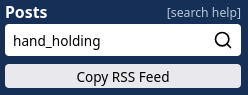
>> click to install <<
click the link above to install the RSS feed button with your preferred userscript manager. if you do not have a userscript manager, install one of them from the links below before attempting to install the RSS feed button:
please note one particular caveat: results returned from e621's RSS feeds are completely unfiltered by default. not even e6's default blacklist is applied. if you do not want to see certain types of content, make sure you exclude tags for them via either the searches you run to make feed links, or via filtering setting that may be in your feed reader of choice.